Active
A Better Process with AI
Framing
The world is shifting. YC-backed companies are shipping with 3-person teams what used to take 30. AI handles the volume — but taste, consistency, and design judgment remain human.
The gap isn't capability anymore. It's maintaining quality when you can build faster than you can review. My process uses AI as the execution layer and a design system as the quality layer. The human decides what should exist and whether it feels right.
Process
The design process, seen here as the classic double diamond, is durable. The division of labor is new. AI owns divergence — generating options, exploring the space. The human owns convergence — deciding what's right, refining what ships. Systemic validates the seam between them.
Discover
Define
Develop
Deliver
Historical
AI-Native
SYS
AI owns divergence
Human owns convergence
Systemic validates the seam
Tools
No tool tries to do everything — they compose into a single workflow where a design system is the shared language.
Systemic
A Homegrown UI that sits on top of the design system and design system documentation.
Obsidian
Stable context as portable .md files
Claude Code
Primary execution environment for AI-assisted design
Paper
A Figma replacement.
Visual source of truth and place for manual design
Foundation
AI without context produces generic UI.
Give business goals, persona constraints, and a design system, and the output shifts from plausible to correct. Context isn't overhead — it's the difference between generating a generic flow and one that solves the problem.
The following is a matrix of all of the places I scaffold as I start a project and constantly refine.
Context
Business
Business goals, founder vision, metrics, stakeholders
Obsidian
Problem Space
Problem Statement, Research, Competitive Analysis, User Interviews, Conceptual Models
Obsidian
Personas
3+ personas that fit our core demographic, but have different needs.
Obsidian
Design Foundation
Design System
The design system primitives and components
Systemic / Generated
System Philosophy
Intent behind decisions so AI can make judgment calls
Systemic / Generated,Manual
Global Design Principles
Constraints that prevent the most common failure modes
Systemic / Generated,Manual
Product Map
An Inventory of where everything is and how its used.
Systemic
What is Systemic
Systemic, a home grown app, is three things: a UI to see the design system and every place it's applied, a generator for principles and documentation, and an MCP server that makes all of it accessible to AI tools in real time.
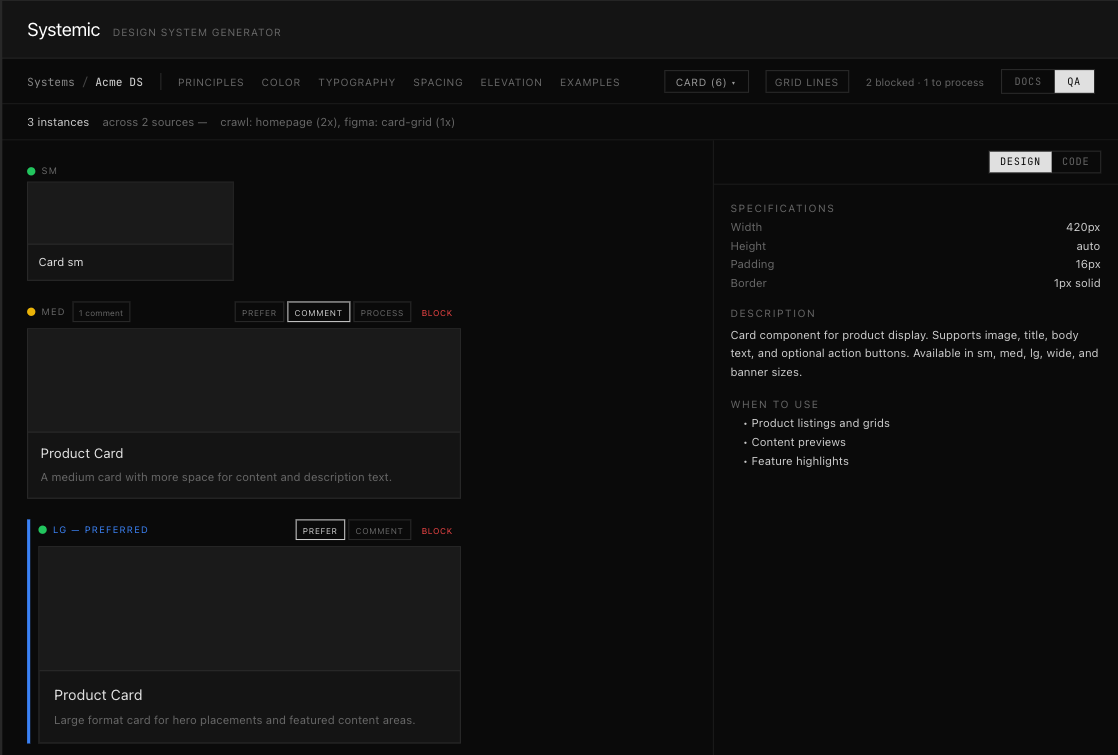
Visual explorer
See every token, component, and widget in the system. See where each one is used across products. One view of the whole surface area.
Principles and docs
Generate design principles, usage guidelines, and component documentation from the system itself. The system describes itself — no separate wiki to maintain.
MCP server.
MCP server. Every token, rule, and principle is accessible to Claude Code, Paper, and any AI tool via Model Context Protocol. The system isn't a reference doc — it's live context that shapes every generation.
How I Design
Every node in the AI-native design process. Why it exists, the rules the AI follows, and the goals it serves.
Product
Define
Structural decisions before any UI is generated
Claude Code / Conversation, Paper
Rather than a skill, I like to have a long form conversation with an AI before creating a plan for /design. The PRD is always tge first artifact. It contains additional business goals, persona constraints, structural decisions, and the conceptual model. Claude Code reads it before generating anything then generates a design prompt that I edit. A good PRD is the highest leverage point to creating good designs
Design
/Design
Generate new flows using the existing system
Claude Code / Skill, Paper
Using a skill as the foundation, Every prompt includes the design system, user principles, and style context. Claude Code generates multiple directions in Paper to create breadth. It works strictly within existing components unless the brief demands something new, in which case it proposes the component for review before building.
/Extend
When a new component is genuinely warranted
Claude Code / Skill, Paper
Extend covers new components, new patterns, new tokens. Taking requirements from /Design, it identifies all of the similar component, the existing and future use cases. The output is always a suggestion with rationale. Includes all of the known possible states on every iteration and cross references to mature design systems.
Refine
Manual edits in Paper — the human hand in the loop
Paper / Manual
The last 10% is the hardest and most fruitful part. Not to mention, the closest to what a designer has historically done. First is curation and finding the right set of approaches and components from what AI generated. Then is visual refinement. Spacing that feels right, hierarchy that reads naturally, the details that separate competent from polished. Paper is where that happens.
Audit
Review
Quality gate before shipping
Claude Code / Skill, Code Base
A Claude Code skill runs before every push — checking component usage, token compliance, and accessibility against the design system. Catches drift before it reaches production.
Live Audit
Find where implementation diverged from spec
Claude Code / Skill, Code Base
Post-release, the same skill audits live pages — surfacing regressions, inconsistencies, and bugs where implementation diverged from the system. Most of my projects are set up as a daily job.
This portfolio is built with this system. display.css is a permanent part of the CTRL design system, not a one-off stylesheet. Every element on this page uses the same tokens as my personal products.